Credit Card Payment Missing From a Statement - What to Check

A payment can leave its source before it appears on the card statement, but an unexplained gap needs a trace across both sides.

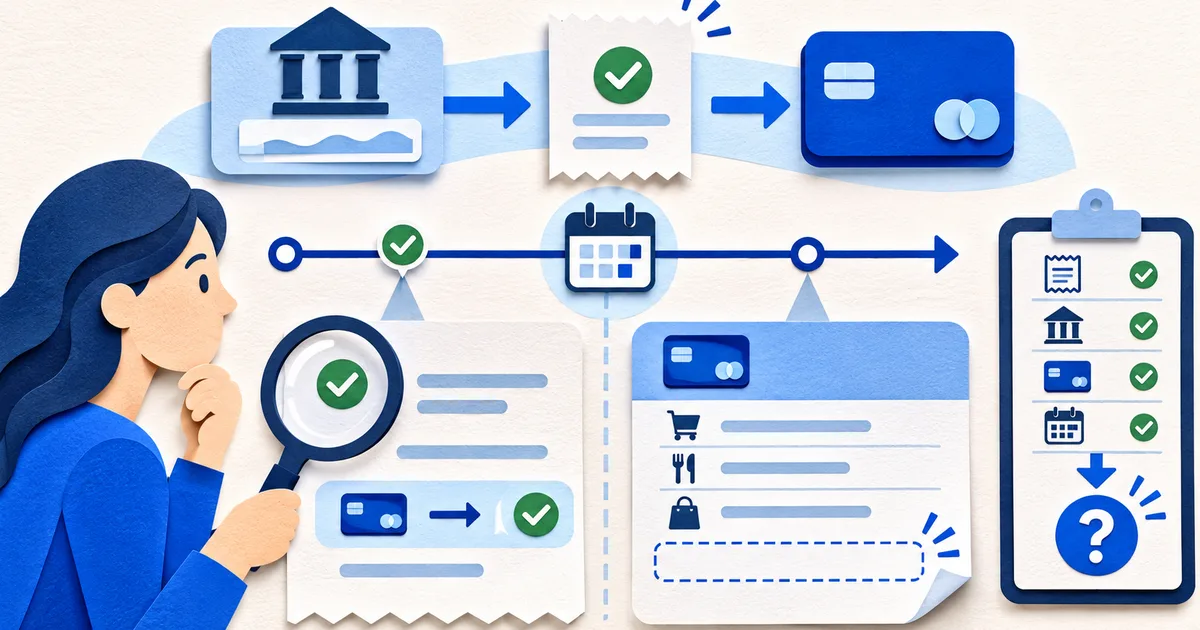
Credit card statement compared with payment confirmation evidence where the expected payment row is missing
Original editorial artwork for this guide. Any depicted account details are fictional.

Verify the statement boundary

Confirm the suffix, closing date, due date, and whether you are viewing an issued statement or live activity.

A payment made after cutoff may belong to the following cycle even when current activity already shows it.

Open a missing-payment case

Put sender and card evidence on one timeline.

Card scope

Suffix, cycle, due date, and live-view time.

Payment

Amount, source, initiation, settlement, and confirmation.

Route

Payee, destination, and replacement-card history.

Issuer

Official contact, case, trace, and response.

Closure

Posting, fees, correction, and retained proof.

Collect sender evidence

Record source account, initiated and settled dates, amount, method, confirmation, and recipient identity.

Confirm whether the debit is final, pending, reversed, or returned. A temporary source-account reduction may not mean delivery.

Check the route

Compare payee, card suffix, bill-pay profile, and issuer instructions. Replacement cards and duplicate profiles can cause confusion.

Avoid sending a second payment as a test until you understand duplicate-payment risk.

Request a trace

Contact the issuer through the number on the card or its official site and provide only necessary confirmation details.

Record the agent, time, case number, expected action, and secure document request.

Reconcile the outcome

When the payment appears, compare effective date, credited amount, fee or interest effect, and available credit.

If charges resulted from the delay, preserve the timeline and request review under the issuer's process.

Start by proving the boundary: card suffix, issued cycle, closing date, due date, and observation time for any live account view. A payment made after statement close can be absent from the PDF yet visible in current activity. Keep the fixed statement and changing screen separate before calling the payment missing or sending another payment that could create a duplicate.

Collect source-side evidence: funding account, amount, initiation time, settlement state, payee, destination suffix, method, confirmation, and any reversal. A pending debit is not proof of completed delivery. Recently replaced cards, duplicate bill-pay profiles, mistyped payees, insufficient funds, and returned payments can interrupt different parts of the route and require different evidence.

Create one timeline for scheduled, submitted, debited, received, posted, returned, and corrected states. Automatic payment being enabled does not prove it ran, and a confirmation page does not prove the issuer credited the account. Record the issuer's expected processing window and cutoff rules from an official source, including weekends and time zone where relevant.

Payment lab: trace funds from bank debit to card credit

If the expected window passes, contact the issuer through the app, known website, or number on the card. Provide the minimum necessary confirmation details and ask for a trace, expected posting treatment, and returned-payment status. Record representative, time, case number, promised action, documents requested, and secure submission route. Do not send full account credentials in ordinary email.

Verify closure in the account record. Compare credited amount, effective date, payment status, fee and interest consequences, available credit, and any related correction. If the delay produced a charge, preserve the full timeline and request review under the issuer process. Keep the sender evidence and issuer resolution together so a later reviewer can see where the transfer failed and how it was fixed.

If a second payment is necessary to protect the account, document the issuer guidance and how any resulting overpayment will be handled. Do not assume that a duplicated credit will automatically return to the funding account. Monitor both payment paths and record refund or credit-balance treatment, since solving the deadline problem can create a separate reconciliation item.

After closure, test the control that failed. Update the saved payee, replace an expired card reference, change reminder margin, verify automatic-payment funding, or document the issuer's processing window. The improvement should respond to the proven cause, not a guessed one. Retain only the case evidence needed under the applicable privacy and retention rules.

Protect the trace evidence. Confirmation numbers, funding-account details, and card suffixes should be shared only with the verified issuer route and masked in general notes. A support screenshot can reveal more than the agent needs. Keep the full record in restricted storage, provide the minimum necessary fragments, and record exactly what was sent. Privacy discipline should remain intact even when a deadline makes the case urgent.

When the case crosses a statement boundary, add both cycles to the record. The earlier statement proves the obligation and absence; the later statement can prove effective credit, fee reversal, or continuing problem. This two-cycle view prevents a live-screen correction from closing the file before the durable issuer record reflects it.

If the payment posted after the cycle closed, the statement balance and current balance guide shows how to keep the later reduction out of the issued ledger.

Once the payment evidence is assembled, use the credit card statement analyzer to review the cycle while leaving the missing row as an explicit exception.

A useful companion workflow is How to Recover a Missing Credit Card Statement. First confirm that a billing cycle closed and the issuer was expected to produce a statement for that account state.

Continue with a statement review

Apply the checks with the credit card statement review tool only for a statement you are authorized to process.

Open the related tool